
Agent questions and receipts
Make Codex and Claude Code check your taste before UI work, answer their design questions from a card on your Mac, and see which of your saved designs they used.
What are agent questions and receipts?
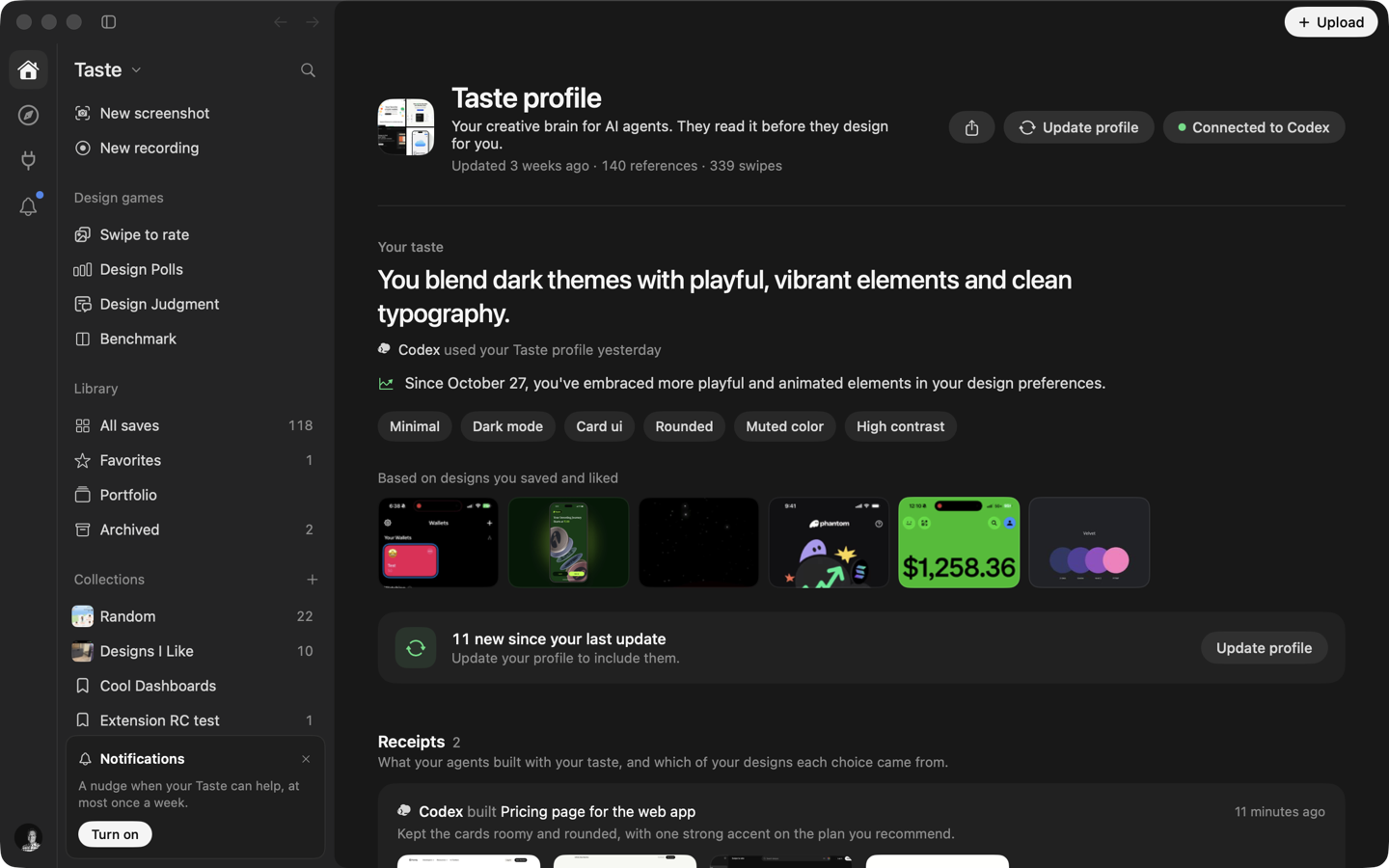
Three things in the Mac app make a connected coding agent use your taste without being reminded. A switch tells the agent to check your Taste before any UI work. While it works, the agent can ask you one short design question. When it finishes, it can leave a receipt that says what it built and which of your saved designs it used.
They work through Taste MCP, so the agent has to be connected first. The app names these agents: Codex, Claude Code, Claude, Cursor, ChatGPT and Figma Make.
How do I make Codex or Claude Code check my taste automatically?
Open My Taste in the Mac app. The first time, a prompt titled “Your taste, in every build” shows a switch for each coding agent found on your Mac: Codex and Claude Code. Turn on the ones you use.
Taste adds a short marked note to that tool’s global instructions file: ~/.codex/AGENTS.md for Codex and ~/.claude/CLAUDE.md for Claude Code. The agent reads that file at the start of every session, in every project.
What does the note tell the agent to do?
Before designing or changing any UI, the agent is told to use the Taste MCP server and make three calls: get_taste_profile for your profile, search_samples for saved designs that fit the task, and get_anti_slop_guardrails for the patterns to avoid.
If a visual choice is a real toss-up, it is told to call ask_taste_question. When the UI work is done, it is told to call report_taste_usage once.
The note also tells the agent to keep the project’s existing design system and to skip all of this for work with no visual part.
How do I turn it off?
Use the same switches under “Your agents” on My Taste, or in AI tools. You can turn it off at any time. Taste deletes only its own block from the file. Everything else you wrote there stays.
Can I use it in Cursor, ChatGPT or Claude?
Yes, by hand. For Cursor, ChatGPT and the Claude desktop app, copy the note from the Mac app and paste it into that tool’s own rules or instructions. Taste does not edit those for you.
What is an agent question?
In the middle of a task, an agent can call ask_taste_question to ask you one short either/or question with two options. It is meant for visual choices the agent cannot settle from your profile and references.
Agent questions work on Mac only for now.
Where do agent questions appear?
As a floating card at the top right of your screen. The Taste Mac app draws it over whatever app is in front, so you do not need to switch windows.
The card shows which agent is asking, what it is building, the question, the two options, “No preference”, and a bar that shows how long the agent will wait.
- Click one of the two options, or click “No preference”.
- Or click the card, then press the Left or Right Arrow key to pick an option.
What happens if I don’t answer?
The agent waits about 45 seconds. With no answer, it uses its own judgment and carries on.
If the Taste Mac app is not running, the agent is told straight away to decide for itself. It does not wait.
What is a receipt?
After UI work, an agent can call report_taste_usage to report what it built and which of your saved designs it drew on. It can cite up to 12 designs, each with a short note saying what the design was used for.
Receipts are listed on My Taste in the Mac app, under “Receipts”. Each one shows the agent’s name, the task, a one-line summary and the cited designs as thumbnails.
Also on My Taste, “See what your agents read” opens your profile text exactly as it is handed to a connected agent.
What does Taste store?
For a question: the question text, the two options, a short context line and your answer. No source code.
For a receipt: the agent’s name, the task, the summary, and the cited designs with their notes. No source code, images or model output are stored. A receipt can only cite designs you can already read.
You can delete your own receipts.
How do I test it?
This takes a few minutes. Keep the Taste Mac app running.
- On My Taste, turn on the switch for Codex or Claude Code.
- Start a new session in that agent. An open session will not have the note.
- Ask it to build a UI screen.
- If a card appears at the top right of your screen, answer it.
- When the agent finishes, open My Taste and look for the new entry under “Receipts”.
Build a pricing page for this project. Check my Taste first, and tell me which saved designs you used.
What success looks like
The agent names designs you recognize, and a receipt for the task appears on My Taste.